An in-depth, non-technical narrative of how I got started with image recognition and classification that serves as a guide to other beginners

In this blog, we will embark on a comprehensive journey from rudimentary image recognition to complex classification problems. Before we get into that, however, I would like to provide a brief explanation of how images are processed in each of these tasks.
Image Processing
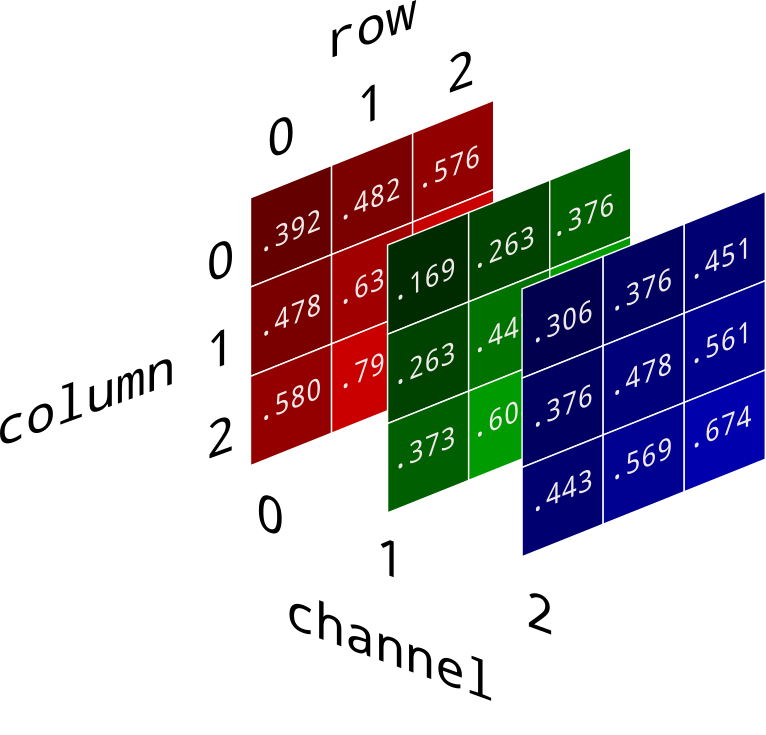
The image is first converted to a 3D array, called a tensor. The size of this tensor can be represented by the expression a×b×c, where a represents the number of rows, b represents the number of columns, and c represents the number of channels. The expression a×b gives us the total number of pixels in the picture. Usually, there are 3 channels – RGB (Red, Green, Blue). Here is a useful pictorial representation of this concept:
Facial Recognition
The first task that I chose was to build a simple facial recognition model, which was easier than one might think. I took 30 pictures of each member of my family using burst mode, the position of the face in each picture varying by 4-5 centimeters at most, on a white background. These images were processed into the correct format, and were now ready to be classified. I used a machine learning algorithm called Stochastic Gradient Descent, mainly because it takes very less time for this algorithm to train. I won’t get into the specifics of this algorithm, but it basically works by adjusting the slope of a line to maximize accuracy. Here is a helpful visualization of it:

For a clear, detailed understanding of Stochastic Gradient Descent, I recommend the following page: https://machinelearningmastery.com/gradient-descent-for-machine-learning/
The model took around 20 seconds to train itself, and then reached an accuracy of 100%. However, this task does not give a good idea of how effective this method is, mainly because the images had very less variability between one another. What this means is that the images of each class were very similar to each other, so the model did not have a hard time finding patterns in the data set. This task merely served as a warm-up for what was about to follow.
Image Classification: Cat or Dog?
Next, I used the famous MNIST data set to test the limitations of the above method. I extracted all the images of cats and dogs from this data set, converted them to tensors, and input them into the Stochastic Gradient Descent algorithm. After 7 hours of training, the accuracy was 54%. Our model is only slightly better than a blind man guessing and is, quite honestly, useless.
How was this possible? How could the model do so well on our previous task, but fall flat on its face on this one? The answer to this question can be found by thinking about how our model really learns. When a model learns, it seeks to pick up any patterns in the data that can be linked to a specific class. In the facial recognition task, it was very easy to pick up patterns in the data set, mainly because all the pictures were taken against a constant background with minimal movement. However, in the second task, there was a lot of variability between instances of each category. What this means is that images of cats differed very much from each other, and images of dogs differed very much from each other. Look at these two pictures:


Although both these images are that of cats, they are very different from each other, in terms of background, overall color and exposed body. This constant difference between pictures of the same category is far too confusing for our basic model, which is why it just doesn’t work. For that reason, I was forced to use a different approach: neural networks, which come under a subset of machine learning called deep learning.
What is a neural network?
The internal workings of a neural network are very complex and math-heavy, so we will not be covering that. Instead, I will try to provide a brief understanding of what they actually do and how they do it. A neural network is basically a program that tries to mimic a human brain. It usually has an array of densely interconnected neurons that allow it to learn things and recognize patterns within the data. Here is a very basic diagram of a neural network:
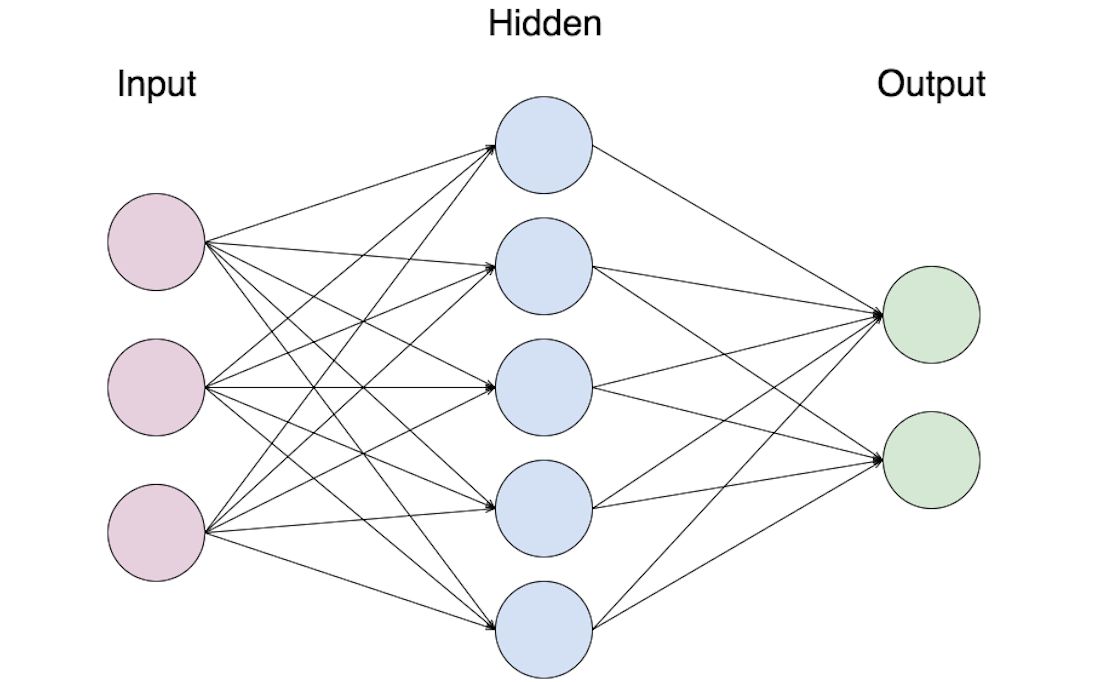
There is an input layer with 3 neurons where the data enters hidden layer with 5 neurons that processes this data and tries to pick up patterns, and finally an output layer with 2 neurons. Neural networks are not restricted to just 1 hidden layer; they can have more too. For a more descriptive explanation of neural networks, watch the following YouTube series by 3Blue1Brown: https://www.youtube.com/playlist?list=PLZHQObOWTQDNU6R1_67000Dx_ZCJB-3pi
As you can see, neural networks are far more sophisticated than our previous model.
Implementing Neural Networks
I used convolutional neural networks (CNN), a special type of network that works well with images. First, I used a relatively small neural network with less layers. The accuracy of this model was 67%, a significant improvement compared to the previous method. However, I knew I could do a better job, so I added a few more layers and fine tuned the parameters, bringing the accuracy up to an impressive 81%. From here on, the addition of new layers made no difference in the accuracy of the model. After pondering over this for a while, I realized that the reason the accuracy was not going any higher was because I had less training data; 12,000 images weren’t enough. So, I decided to generate more training data using image augmentation routines. Image augmentation is a method in which new images are generated by slightly modifying the original ones (rotation, translation, adjusting brightness, etc.). I managed to generate around 55,000 images using this method. When I re-trained my network, the accuracy jumped to 89%.
Using CNNs for a real-life problem
After my success with cat/dog classification, I decided to use my knowledge to build a model that could look at a picture of a cell and diagnose whether it was infected with the malaria parasite or not. I used a data set of approximately 27,000 pictures of cells, half with malaria and the other half without it. I loaded it into a CNN and managed to get an outstanding accuracy of 97%, which likely would have increased if I gave the network more time to go over the data set again. This task gave me a glance at the immense capability of computers in many different fields.
Summary
With these three tasks, I was able to familiarize myself with the idea of image classification and machine learning as a whole. It also helped me understand and highlight the limitations of pure machine learning in the context of image recognition and classification; there are just some problems that should be solved using deep learning. A general trend that I observed was that a significant increment in the complexity of a problem seemed to render pure machine learning redundant for the most part. I was also able to apply this trend to other problems, such as text analysis.
What next?
I plan to continue learning about neural networks, and I will likely venture into the field of object detection, multi-label classification and advanced sentiment analysis in the context of text and speech.
Links
A technical walk-through of the implementation of task 2 (Cat or Dog): https://github.com/dhruvmk/image_classifier-cat-vs-dog
Bonus: Source code of a simple sentiment analysis project that uses a method similar to task 1: https://github.com/dhruvmk/sentiment_classifier
Thanks for reading
 Creating a Linear Regression Model in Python